Beatplan field sales app: buy once, own it, set it up with your AI (2026)
Beatplan
Field sales app · already running a real distributor

Set it up yourself with your own ChatGPT, Claude or Codex. Ready the same day.

Download Beatplan, open it in your AI assistant, and tell it your company's name. It sets up your field sales app step by step, in plain English, and asks before it changes anything. Your app and your data stay on your own accounts, and you pay once instead of every month.

No sign-up: open the demo and tap Admin, Director or Accounts. Sample data resets every night.

Building for clients? Commercial and Agency licences →

Claude · beatplan
you › Set up Beatplan for my company, Northwind Seeds. We sell in euros in two regions, North and South. My email is maria@northwindseeds.com.
· reading the setup guide
✓ Brand, currency and regions saved
✓ Database created on your Supabase account
✓ 33 security tests passed
✓ Push notifications switched on
✓ First admin added: maria@northwindseeds.com
✓ Web console built
claude › All done. Sign in with your email and add your sales reps.
Works the same in ChatGPT's Codex. You'll need two free accounts (Supabase and Expo); your assistant tells you when to create them.

Running the distributor that built it, every working day since 25 November 2025

7,916field activities logged
1,424farmers on record
405payments validated
12company cars managed
How setup works

No developer needed. Three steps, done by you.

The download includes a setup guide written for Claude, ChatGPT and Codex. They do the technical work and ask you only about your business: your company name, currency and sales regions.

  1. Buy and download

    Pay once and the full source code downloads straight away: phone app, web console, database and the setup guide.

  2. Open it in your AI assistant

    Use Claude Code (in the Claude app) or Codex (in ChatGPT, or on its own), open the folder and say "Set up Beatplan for my company". It brands the app, creates your database, runs the security tests and adds you as the first admin.

  3. Add your team

    Sign in to the web console, add your reps, and they install the app on their phones. From then on it's your system, on your own accounts.

One-minute tour

A rep's day and the director's view, in one minute.

For agencies and developers

Twelve months of building, already done.

This is what your client would be paying you to build from scratch. All of it is written, tested and running in production.

55,297lines of app code
86screens across phone and web
64database tables
132server functions
163row-level security rules
33automated security tests

What would it cost you to build?

Set these to your own team. The original took about twelve months from first commit to today, including eleven months of daily use and fixes in the field.

Building it yourself
$64,000
Buying it, then delivering to clients
$4,900
You keep $60,510 of the first client's budget, and reuse the code on the next one with an Agency licence.
For distributors and sales teams

Stop renting your field team's software.

Subscription field sales tools commonly start around $39 to $58 per rep per month. Here is twenty reps at the lower end, compared with owning Beatplan.

20 reps × $39 × 12 months. You pay your own hosting: the database's paid plan starts at about $25 a month.

What your reps carry in their pocket.

Every visit is time-stamped and GPS-checked, every collection goes straight to Accounts, and the day's progress against target is on one screen. You see the whole team the same morning.

The setup steps above are all it takes to get here. Hosting runs on your own accounts, from about $25 a month for the database.

Ryan Field · Riverside 1Fri 23 Oct
  1. Day startedOdometer 35,348 km · Ford Hilux
  2. Dealer visitHarvest Supply CoReorder discussed · photo · GPS 41.82, −87.63
  3. CollectionPrairie Farm StoreUSD 1,240 cheque · slip sent to Accounts
  4. Farmer meetingRiverside North8 farmers · wheat, corn
  5. Sales callMeadow Co-opSpring program order
Visits 3 / 5Collected USD 1,240Sep–Dec 74%
Why it exists

I run a fertilizer distribution business. Our reps visit dealers and farmers every day, and I needed to know, every morning, who visited whom, what was collected, which dealer was slipping and which car was due a service.

No software we could rent fitted how a distributor actually works, so we built our own. Our field team has run on it every working day since November 2025, and every rough edge it had, our reps found and we fixed.

Beatplan is that system with our name taken out: the same code, a database already secured and tested, and a setup guide written so an AI assistant can install it for your company.

The founderBeatplan

Look inside before you pay

Clean, documented and tested.

Read the same guides your team or your AI assistant will use. Every database table has row-level security rules, and the included test suite checks who can read and change what before you go live.

beatplan/
├─ App.js               phone app shell, tabs by role
├─ config/brand.json    your name, currency, regions
├─ src/
│  ├─ screens/          86 screens: field ops, directory,
│  │                    payments, orders, fleet, events
│  ├─ screens/web/      the office web console
│  ├─ ui/               shared design system
│  └─ config/           one place for brand values
├─ supabase/
│  ├─ migrations/       64 tables, 132 functions
│  ├─ functions/        push notifications
│  ├─ tests/            smoke + 33 security checks
│  └─ demo/             sample data with nightly reset
├─ docs/                setup and configuration
├─ CLAUDE.md, AGENTS.md instructions for AI assistants
└─ LICENSE.md
Phone app
Expo SDK 58, React Native 0.88
Backend
Supabase Postgres
Works offline
Entries queue and sync later
Your brand
One settings file
What your users get

A day on Beatplan, from the first visit to month end.

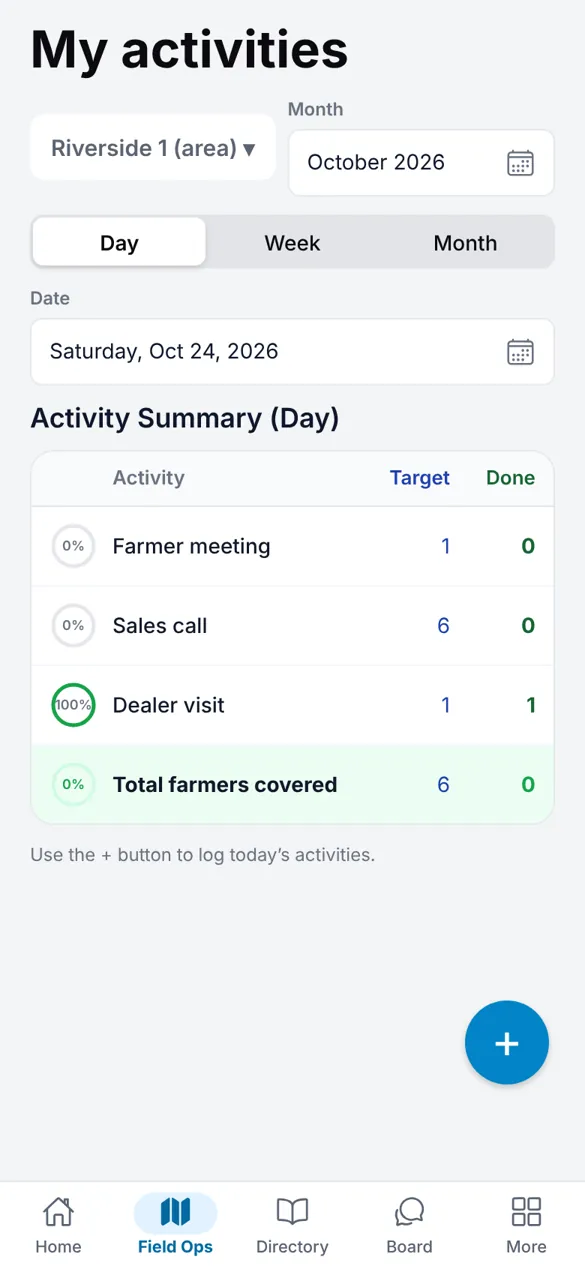
The rep starts the day

Field Ops opens on today's targets. The rep starts the day with the car's odometer and works through their own dealers and farmers, with or without signal.

Field Ops screen with the day's activity targets

Every visit proves itself

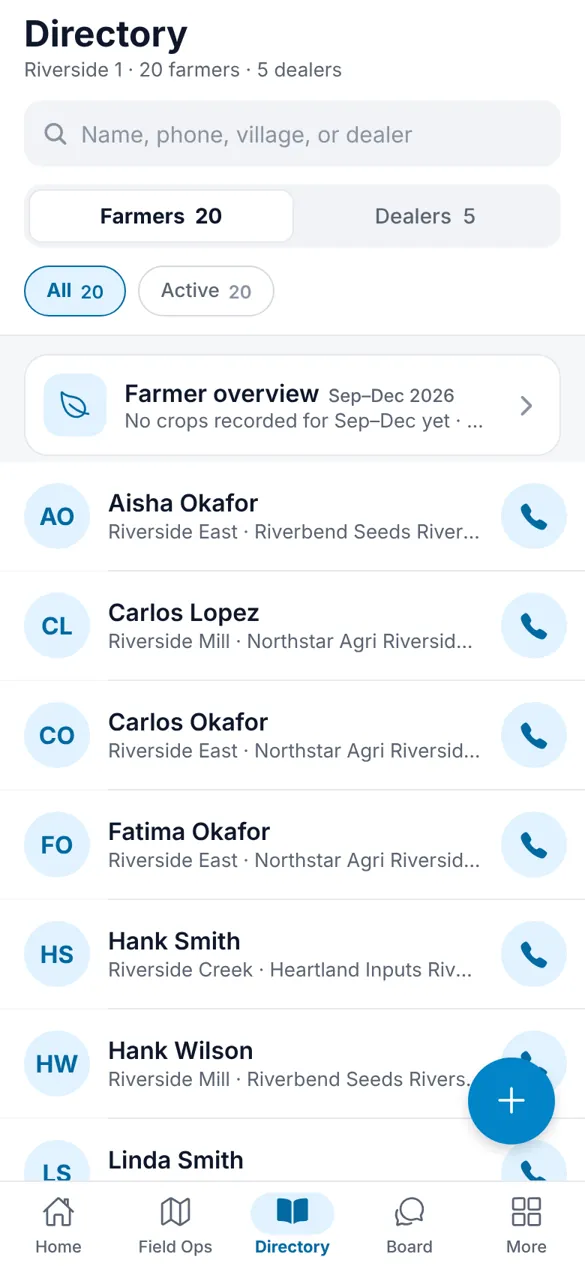
Visits are logged with location and photos on the spot, against a directory of dealers and farmers with their history and crops.

Directory of farmers and dealers

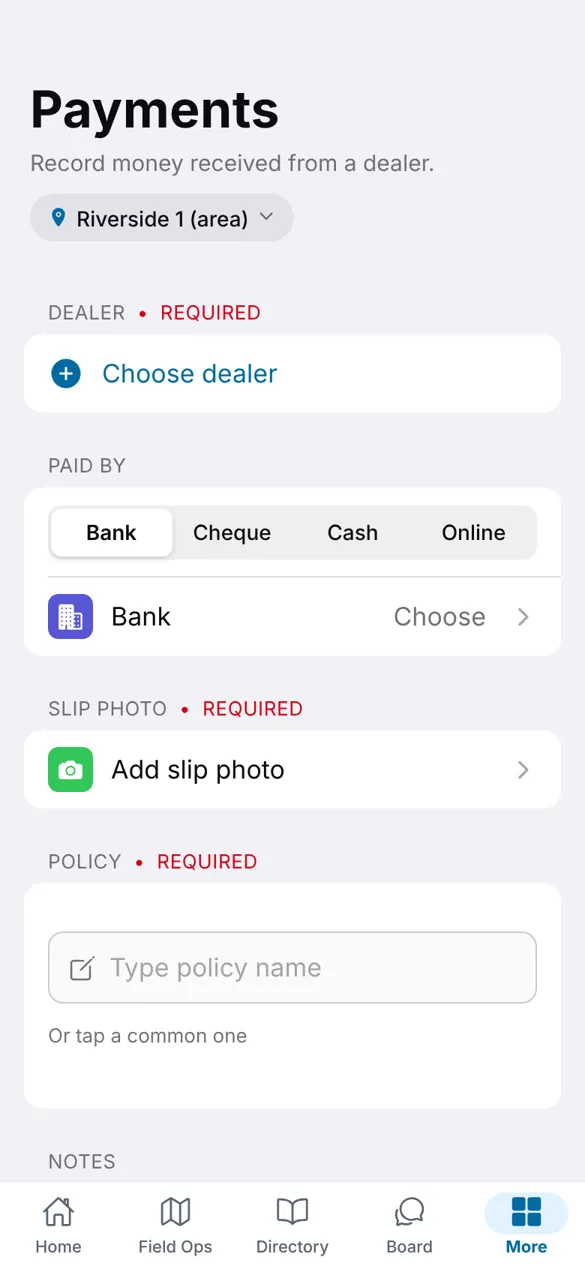
Money is visible the same day

A collection is recorded with a photo of the slip. Accounts validates it from the office, and only validated money counts toward targets.

Payment entry with dealer, method and slip photo

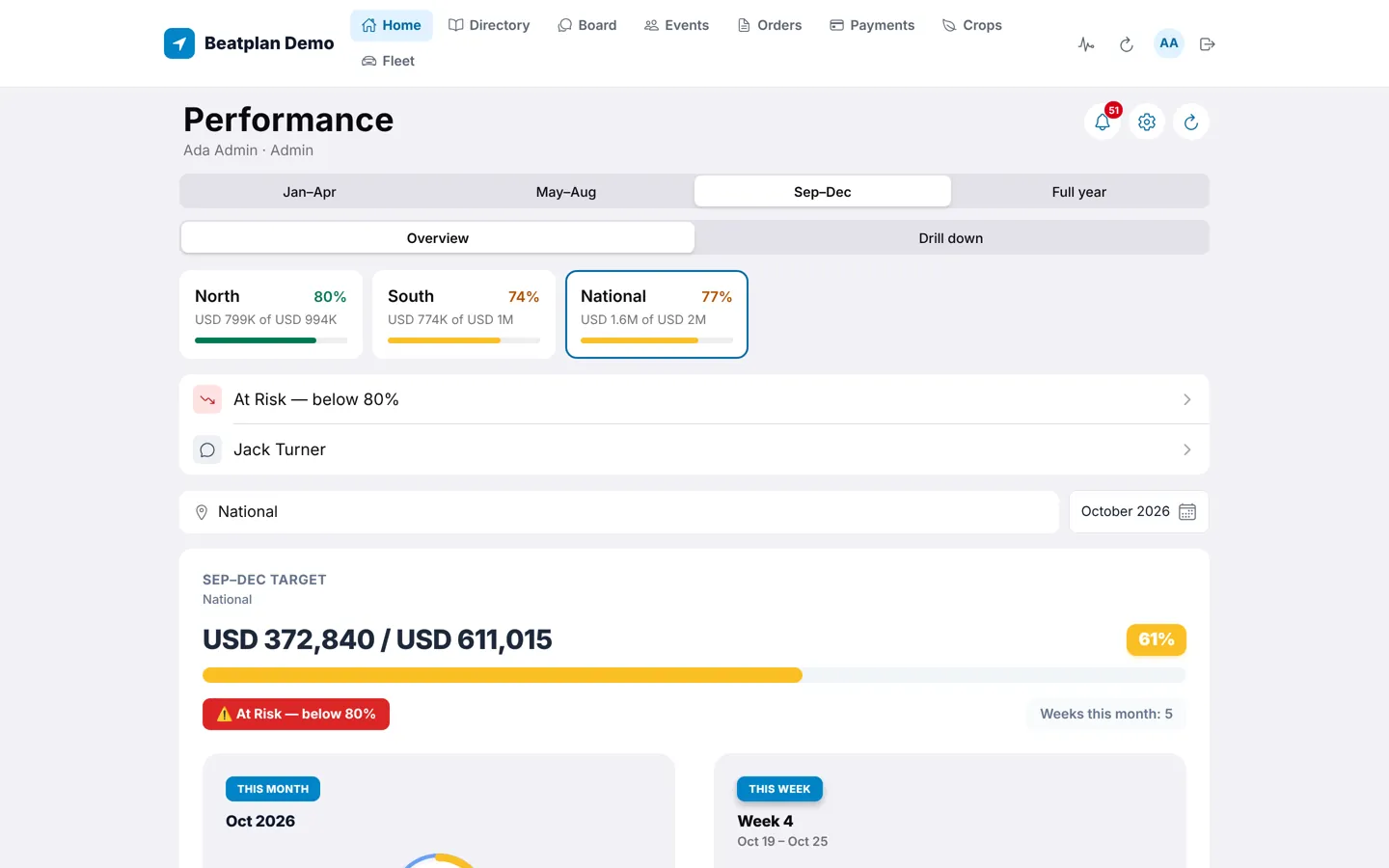
The office sees the whole day

Directors see every region against its target for the period, with at-risk areas flagged below 80%, and every visit on the team Board.

Performance dashboard with regions against target

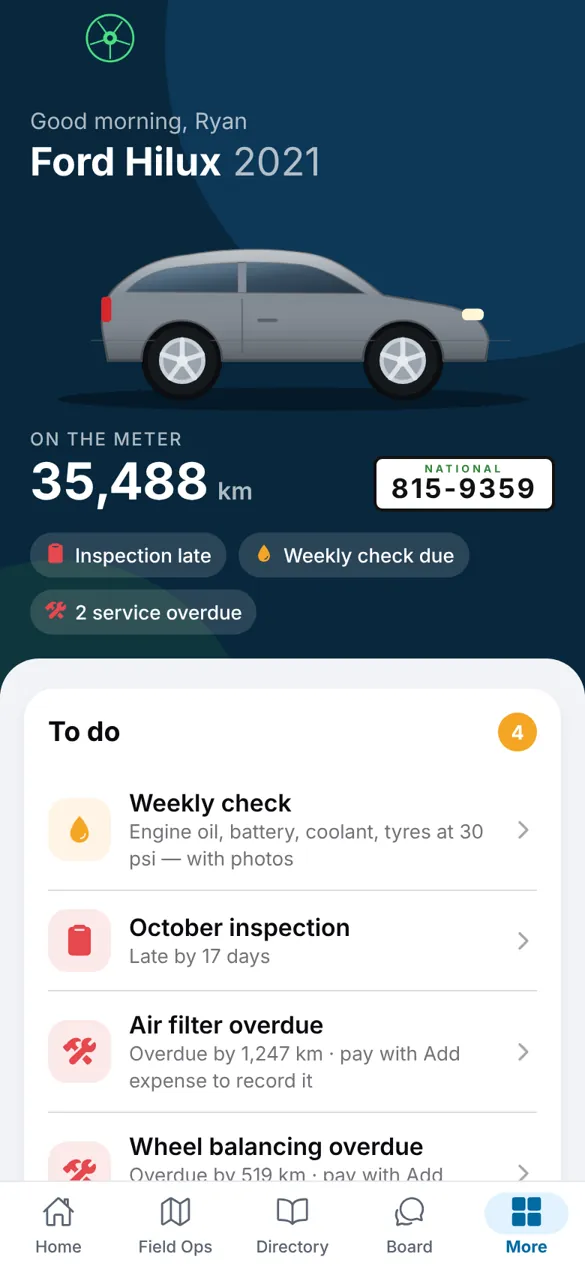
Orders, cars and expenses close themselves

Orders move from review to dispatch to payment. Meter readings and inspections build each rep's expense sheet for the lead to verify and Accounts to pay.

Fleet screen with the rep's car and its to-do list
Pricing

One payment. The code is yours to run.

Standard

$2,900one-time

You run a field sales team.

  • Full source code: phone app, web console, database
  • One production deployment for your company and its subsidiaries
  • Publish the apps under your own name
  • All 1.x updates
Buy Standard

Commercial

$4,900one-time

You're delivering it to one client.

  • Everything in Standard
  • Deploy it for one client company as a paid project
  • Run it on the client's own name and accounts
Buy Commercial

Agency

$12,900one-time

You'll deliver it again and again.

  • Everything in Commercial
  • Unlimited client companies
  • White-label: sell it under your own product name
Buy Agency

Prices in US dollars. Sales tax and VAT are worked out at checkout by our payment partner, the merchant of record, which also delivers the download. Every tier is a licence to use and change the code, not to resell the source; read the licence.

Questions

Before you buy

Is it really used in production?

Yes. The same code runs the field team of the distributor that built it, every working day since November 2025. The figures at the top of this page come from that live system.

Can I see the code quality before buying?

You can read the setup guide, configuration notes, design guide and the rules written for AI assistants on this site, see the full folder layout above, and use every role in the live demo. The source itself is delivered after purchase.

Can I deliver it to my clients?

Yes, with a Commercial licence for one client or an Agency licence for as many as you like. You can run it on each client's own name and accounts. With Agency you can also sell it under your own product name. You may not resell the source code itself.

Do I need a developer?

No. The download includes a setup guide written for Claude, ChatGPT and Codex. Open the folder in Claude Code (part of the Claude app) or Codex (part of ChatGPT), describe your company, and it does the branding, database setup, security tests and first admin, asking before each change. These coding tools come with the paid Claude and ChatGPT plans, from about $20 a month; if you already pay for one, you have it. You'll also need free Supabase and Expo accounts, and your own App Store and Google Play accounts when you publish the phone apps.

Is support included?

No. Beatplan is sold as source code without a support contract. The setup guide and the instructions for AI assistants cover installation, branding and changes.

What does it cost to run?

The database runs on Supabase, which has a free plan for testing and paid plans from about $25 a month. Building the phone apps uses Expo's free tier. Publishing to the App Store and Google Play needs your own developer accounts.

Can I change the names, currency and language?

Yes. Company name, colours, currency, regions, role names, activity names and target periods are set in one settings file. A second interface language can be switched on beside English.

Where can it be used?

Worldwide, except Pakistan. The licence does not allow use, deployment or sale in Pakistan or for organisations based there.

Can I get a refund?

Within 14 days, if the download doesn't match this page or won't install by following the setup guide and we can't fix it. Because you receive the full source code at once, we don't refund a change of mind, so try the live demo first. Details in the refund policy.
See it running before you buy.

The demo is the real product with sample data. Sign in as the Director and look at the week.